New features in 3.0.0
Cumulative release notes covering everything since version 2.1.0 (24th May 2022)
Version 3.0.0 introduces a brand new native rendering backend based on PanamaGL, which leverages the JDK 22 Foreign Function & Memory API to bind to OpenGL in pure Java. It also bundles all the improvements that landed during the 2.2.x line: a much more capable 2D mode (XZ/YZ views, axis flipping, mouse zoom), animated GIF export, JavaFX support for modern JDKs, configurable up axis, and a long list of fixes around HiDPI layout, text rendering and the colorbar.
New native backend: PanamaGL
Jzy3d historically relied on JOGL to bind Java code to the native OpenGL implementation of the host. JOGL works very well, but its JNI-based binding has to be regenerated for each combination of {OS, CPU, JDK} and requires a CI infrastructure with real hardware nodes for every target platform.
PanamaGL is a new, pure-Java OpenGL binding produced with JExtract on top of the Foreign Function & Memory API (JEP 454) introduced in JDK 22. It exposes a single GL interface and ships per-OS wrappers for linux, macOS and Windows, plus the companion windowing libraries CGL (macOS), GLX (Linux) and WGL (Windows).
The integration into Jzy3d is provided as a parallel set of Maven modules, sitting next to the existing JOGL and EmulGL backends. Existing applications based on JOGL or EmulGL continue to work unchanged.
jzy3d-native-panama-gl-core - core integration of PanamaGL into the Jzy3d painter / canvas model.jzy3d-native-panama-gl-swing - PanamaGLSwingCanvas for Swing applications.jzy3d-native-panama-gl-javafx - PanamaGLJavaFXCanvas for JavaFX applications.jzy3d-native-panama-gl-swt - PanamaGLSWTCanvas for SWT applications.
Tutorials are available for each toolkit: jzy3d-tutorials-panama-gl-swing, jzy3d-tutorials-panama-gl-javafx and jzy3d-tutorials-panama-gl-swt.
Why PanamaGL
- Easier to rebuild and contribute to. Bindings are regenerated by running JExtract; there is no native code to compile.
- Modern JDK foundation. Built on the Foreign Function & Memory API (JDK 22), aligned with the future of native interop in Java.
- Same windowing toolkits as before. AWT, Swing, JavaFX and SWT are all supported.
- Coexists with JOGL. The framework keeps its
IPainter abstraction, so PanamaGL is just another backend - charts and drawables are unchanged.
HiDPI support
The PanamaGL canvases for Swing, JavaFX and SWT now report physical pixels through getRendererWidth() / getRendererHeight(), so the existing HiDPI layout logic of Jzy3d (axis ticks, colorbar, margins) works the same way as it does on the JOGL backend.
2D charts
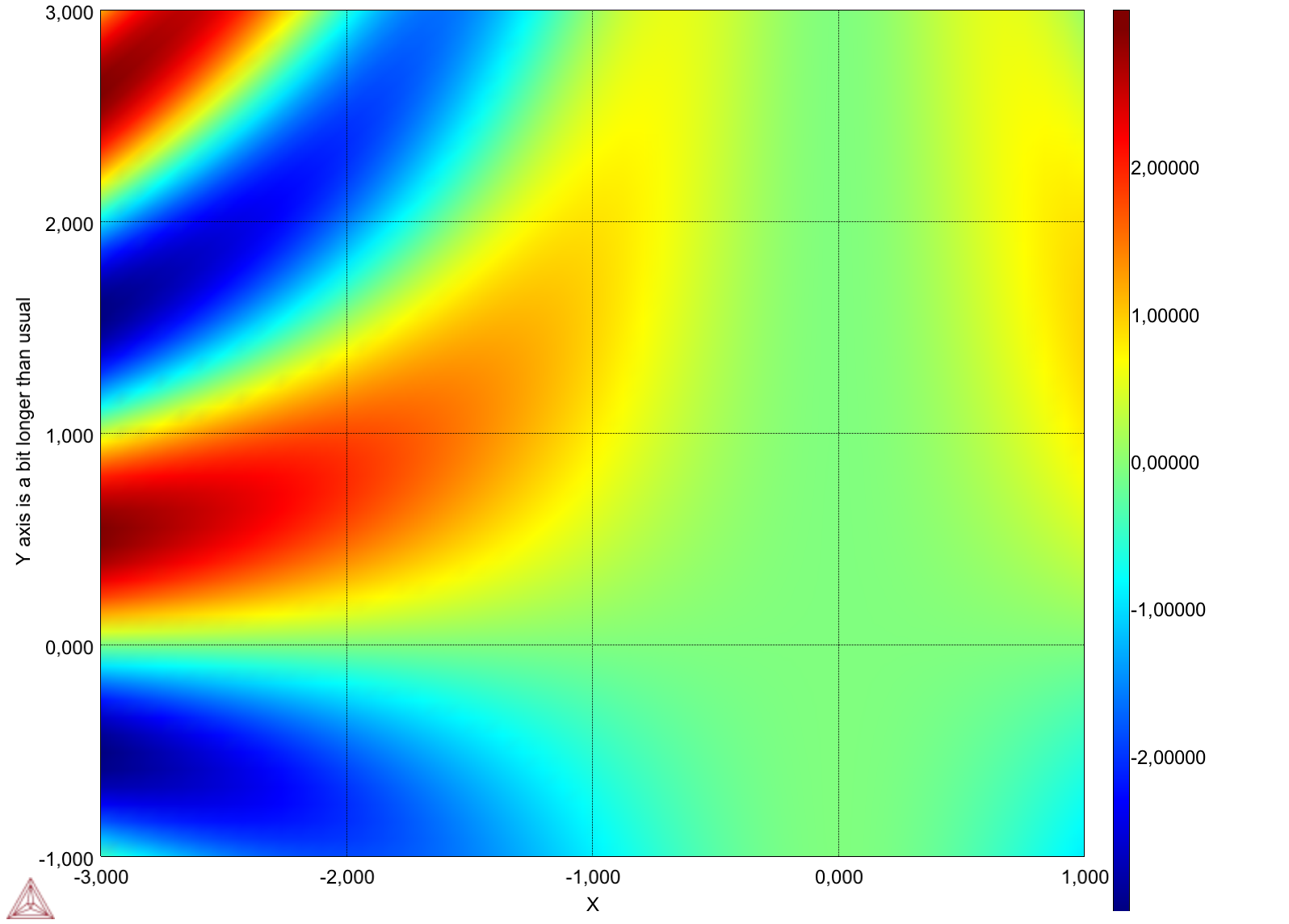
2D charts : XZ and YZ views, axis flipping
Version 2.1.0 introduced a much cleaner 2D mode for the XY plane. The 2D mode has now been generalised to XZ and YZ views, with the same level of polish: tick placement, axis label placement, depth range processing and clipping planes all behave correctly for the three planes.
A more handy viewpoint setter is provided for XYZ views, and the view2D / view3D toggle has been generalised so that any 2D plane can be used as a starting point.
Each axis of a 2D view can also be flipped: only X, only Y, or both for XY charts; only the horizontal, only the vertical, or both for XZ and YZ charts. This is useful when working with conventions that expect the origin in another corner (image coordinates, geographic data, etc.).
2D charts : mouse zoom
A 2D mouse selection can now be used to zoom into a region of a chart. The selection:
- Supports XY, XZ and YZ views.
- Is correctly cropped to the current axis bounds, including when a colorbar is active.
- Plays well with HiDPI screens, including on macOS, and with EmulGL rendering.
- Honours flipped X / Y axes.
- Refuses to zoom on a degenerate (zero or negative) range.
A mouse-over format can be defined for the projected coordinates, and the painter now exposes modelToScreen / screenToModel directly, which simplifies any custom mouse interaction. Mouse-move events no longer fire in 3D mode, which avoids spurious refreshes when rotating a chart.
Animated GIF export
Animations can now be exported as animated GIF files directly from the AWT and Swing native canvases. The GifExporter supports:
- A configurable background color.
- A target frame rate, with frames skipped when the rendering loop runs faster than the requested rate.
- An adaptive frame rate mode that records each frame with its actual delay since the previous frame, useful for variable-cost animations.
- Frame-wise delay configuration for fully manual control.
- Verification that the output GIF total duration matches the expected one.
JavaFX support for modern JDKs
JavaFX rendering has been reworked to support JDK 17+:
- A working
NewtJavaFXCanvas for JDK 8 (offscreen rendering) is preserved.
- A
SwingNode-based canvas is available, with an AWT painter for SwingNode, allowing JavaFX applications to embed Jzy3d charts on JDK 17.
- The JavaFX canvas resize logic has been simplified and rendering speed has been improved.
- JavaFX capabilities can now be overridden by the application.
- JavaFX modules have been consolidated into a single Maven module with JavaFX dependencies set as
provided, leaving the choice of the JavaFX runtime to the application.
Layout, HiDPI and rendering fixes
- HiDPI layout. The view-pixel-scale listener checks for consistent values to avoid layout glitches when moving a window between monitors. Legends can be reconfigured upon a pixel scale update. A specific scaling rule has been added for Windows 10 + HiDPI.
- Colorbar. The vertical colorbar position is fixed for EmulGL charts; colorbar margins are correctly scaled with the pixel ratio; X tick and axis labels no longer overlap with EmulGL.
- Margins. A new margin class has been introduced to deal with asymmetric margins.
AWTImageViewport applies margins properly in HiDPI and non-HiDPI mode.
- TextRenderer. A memory leak in the AWT TextRenderer has been fixed. The renderer no longer crashes when a label position cannot be projected to the screen, and a smart text renderer can be disabled to prevent occasional hangs.
- Swing 2D view. A workaround has been added for a Swing repaint bug that caused 2D view updates to be missed; the view is now rendered twice after a viewpoint change to ensure it is fully up to date.
- EmulGL. Clipping planes work correctly in EmulGL; XZ / YZ projections are workarounded (issue 274); the EmulGL margin processing is consistent with HiDPI.
- Composite + VBO. Composite drawables can now be backed by VBOs.
- Configurable up axis The up vector of the camera has historically been Z. It is now possible to define another up vector (X or Y), which is convenient for data sets where the natural vertical axis is not Z. The
AxisBase implementation has also been improved.
Drawing primitives
- Smooth lines. Line strips can request OpenGL line smoothing.
- Trigonometric tick renderer. A new tick renderer formats values as multiples of pi (with tests).
- 2D mappers and projection utils. Helpers for 2D mappers, gradient primitives and projection utilities have been added, along with an arrow primitive suitable for 3D vector fields.
- Mouse-driven object editing. The AWT mouse picker now handles
mouseDragged, paving the way for moving objects with the mouse.
- Drawable text. A drawable text can be anchored to a point and laid out smartly with respect to the camera.
Maven configuration
Jzy3d 3.0.0 keeps the modular layout introduced in 2.0.0: core classes, native GL implementations (JOGL or PanamaGL) and the EmulGL CPU implementation are split across separate artifacts. Add the dependency that matches your backend and your windowing toolkit.
Maven dependencies
Maven dependencies for PanamaGL binding (new)
For PanamaGL (new in 3.0.0, requires JDK 22+) in Swing
<dependency>
    <groupId>org.jzy3d</groupId>
    <artifactId>jzy3d-native-panama-gl-swing</artifactId>
    <version>3.0.0</version>
</dependency>
For PanamaGL in JavaFX
<dependency>
    <groupId>org.jzy3d</groupId>
    <artifactId>jzy3d-native-panama-gl-javafx</artifactId>
    <version>3.0.0</version>
</dependency>
For PanamaGL in SWT
<dependency>
    <groupId>org.jzy3d</groupId>
    <artifactId>jzy3d-native-panama-gl-swt</artifactId>
    <version>3.0.0</version>
</dependency>
Maven dependencies for EmulGL (CPU) rendering
For emulated OpenGL
<dependency>
    <groupId>org.jzy3d</groupId>
    <artifactId>jzy3d-emulgl-awt</artifactId>
    <version>3.0.0</version>
</dependency>
Maven dependencies for JOGL binding
For native OpenGL via JOGL in AWT
<dependency>
    <groupId>org.jzy3d</groupId>
    <artifactId>jzy3d-native-jogl-awt</artifactId>
    <version>3.0.0</version>
</dependency>
For native OpenGL via JOGL in Swing
<dependency>
    <groupId>org.jzy3d</groupId>
    <artifactId>jzy3d-native-jogl-swing</artifactId>
    <version>3.0.0</version>
</dependency>
For native OpenGL via JOGL in JavaFX
<dependency>
    <groupId>org.jzy3d</groupId>
    <artifactId>jzy3d-native-jogl-javafx</artifactId>
    <version>3.0.0</version>
</dependency>
For native OpenGL via JOGL in SWT
<dependency>
    <groupId>org.jzy3d</groupId>
    <artifactId>jzy3d-native-jogl-swt</artifactId>
    <version>3.0.0</version>
</dependency>
Jzy3d maven repository
<repositories>
  <repository>
     <id>jzy3d-snapshots</id>
     <name>Jzy3d Snapshots</name>
     <url>http://maven.jzy3d.org/snapshots</url>
  </repository>
  <repository>
     <id>jzy3d-releases</id>
     <name>Jzy3d Releases</name>
     <url>http://maven.jzy3d.org/releases</url>
  </repository>
</repositories>
Downloading the jars
You can download jars manually from the Maven repositories :
Documentation
- The tutorials are the first place to learn the framework, with dedicated modules for the JOGL, EmulGL and PanamaGL backends.
- The Developer Guide is the second direction to get much more code examples.
- The Javadoc may help.
- The PanamaGL repository documents the binding itself, independently of Jzy3d.
|